Institutional high-quality accreditation link stiky-sticky

▲ Back to Top

Tuition payment settlement for the second academic period 2025

ATTENTION STUDENT!

HERE WE ANSWER YOUR QUESTIONS ABOUT YOUR REGISTRATION

WHERE DO I DOWNLOAD THE REGISTRATION RECEIPT?

Here: https://plataforma.ucundinamarca.edu.co/aplicacionesB/condicionales/apl_gen_public.jsp?id=ValLiquidaciones

WHAT ARE THE PAYMENT DATES?

  • Tuition payment for new students: July 17 – July 24, 2025
  • Tuition payment for returning students: July 17 – August 5, 2025
  • Tuition fees for postgraduate students: July 17 – August 11, 2025

WHAT ARE THE FEES AND COSTS INCLUDED IN THE TUITION FEE?

REGULAR ENROLLMENT FOR NEW STUDENTS:

CONCEPT COMPLETE DTO 10% VOTING FREE
TUITION $1.480.400 $1.332.400 –
STUDENT ID $23.700 $23.700 $23.700
LIFE INSURANCE $11.000 $11.000 $11.000
TOTAL TO PAY $1.515.100 $1.367.100 $34.700

REGULAR ENROLLMENT FOR RETURNING STUDENTS:

CONCEPT COMPLETE DTO 10% VOTING FREE
TUITION $1.480.400 $1.332.400 –
LIFE INSURANCE $11.000 $11.000 $11.000
TOTAL TO PAY $1.491.400 $1.343.400 $11.000

REGULAR ENROLLMENT FOR RETURNING STUDENTS GRADUATION PROJECT:

CONCEPT 1ST TIME 50% 2ND TIME 75% 3RD TIME 100% 4TH TIME 125%
TUITION $740.200 $1.110.300 $1.480.400 $1.850.500
LIFE INSURANCE $11.000 $11.000 $11.000 $11.000
TOTAL TO PAY $751.200 $1.121.300 $1.491.400 $1.861.500

REGULAR ENROLLMENT FOR RETURNING STUDENTS GRADUATION PROJECT – ELECTION DISCOUNT 10%

CONCEPT FIRST TIME 2ND TIME 3RD TIME 4TH TIME
TUITION $666.200 $999.300 $1.332.400 $1.665.500
LIFE INSURANCE $11.000 $11.000 $11.000 $11.000
TOTAL TO PAY $677.200 $1.010.300 $1.343.400 $1.676.500

REGULAR ENROLLMENT FOR RESIGNED STUDENTS GRADUATION OPTION:

CONCEPT FIRST TIME 2ND TIME
TUITION $356.000 $1.480.400
LIFE INSURANCE $11.000 $11.000
TOTAL TO PAY $367.000 $1.491.400

REGULAR ENROLLMENT FOR RESIGNED STUDENTS – ELECTORAL DISCOUNT 10%

CONCEPT FIRST TIME 2ND TIME
TUITION $320.400 $1.332.400
LIFE INSURANCE $11.000 $11.000
TOTAL TO PAY $331.400 $1.343.400

WHAT HAPPENS IF I HAVE ACADEMIC DEBTS?

  • If you have any outstanding academic debts, you must check them through the institutional platform in the Treasury Services / Academic Debts module and generate your payment order. Once generated, you can download your payment order from the IG Order module.
  • If you have submitted the items within the established dates, you must contact the Academic Support Office.
  • If your receipt is overdue or you have any questions, please use the University's SOLUTIONS DESK via the following link: https://mesadesoluciones.ucundinamarca.edu.co/osticket/upload/

WHAT DO I DO IF I CAN'T FIND THE ELECTION DISCOUNT ON MY PAYMENT RECEIPT?

If you applied for the election discount and it is not reflected on your payment receipt, please use the University's SOLUTIONS DESK via the following link: https://mesadesoluciones.ucundinamarca.edu.co/osticket/upload/

  • (Requests submitted through other channels will NOT be processed)
  • Please note that if you did not upload your voter registration certificate within the established dates, the platform is not enabled to upload voter registration certificates after the deadline.

IF YOU HAVE AN INSTALLMENT PLAN (TUITION FINANCING)

To download the receipt corresponding to your Financing and be active for the IIPA 2025, you must carry out the following steps:
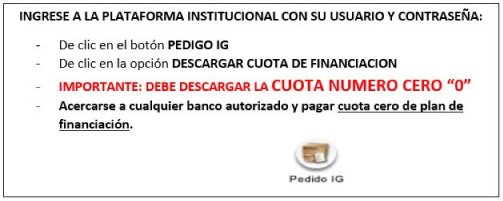
Tuition payment settlement for the second academic period 2025 — image 2 of 3

YOU SHOULD TAKE INTO ACCOUNT

  1. Be up to date with the University in all respects; otherwise, the enrollment settlement for IIPA 2025 will NOT be generated.
  2. Print your receipt on a laser printer so that the barcode can be scanned when you make the payment at your preferred bank. Undergraduate students can use Banco Davivienda or Banco Agrario, while graduate students can only use Banco Davivienda.
  3. The only checks authorized for tuition payment are those generated by Severance Funds, for which you must write on the back: full name, identity document number, career, contact number.
  4. If the tuition payment is to be made by an external entity via electronic transfer (National Savings Fund, Foundations, Municipalities, Severance Funds, Banking Entities, etc.), it must be sent to the treasury office via email. [email protected] A copy of the transfer receipt is required for a successful financial registration process. Additionally, remember that the credit application process must be completed before the end of the ordinary or extraordinary registration payment dates.
  5. DO NOT SEND PAYMENT PROOF TO THE EMAIL ADDRESS. The payment will be reflected once the University of Cundinamarca has processed it in their system. Please note that this process may take up to 72 hours after payment. You can also check the status of your payment on the university's website where you generated your tuition statement; it will show "PAID" if it has been registered in the UCUNDINAMARCA system.
  6. Once your payment is processed by the system, a graphical representation of the electronic invoice will be generated. This document does not represent any additional charges, nor should it be cancelled.

ADDITIONAL REMINDER

  • Please remember that if you are making your payment on the last day according to the established dates, it must be during normal business hours, as the transaction date will be the same day. If you make your payment outside of regular or extended business hours, it will be reflected on the next business day, which will result in your payment not being accepted by the bank and/or in our system.
  • Remember to comply with the payment dates established for each semester in the Academic Calendar; no exceptions will be made.
  • CHECK THAT THE RECEIPT GENERATED BY THE SYSTEM IS IN YOUR NAME AND DOCUMENT NUMBER.
  • Do not pay at bank correspondents or make transfers to UCundinamarca accounts; it is recommended to use authorized banks and/or the online payment of the University of Cundinamarca.

NOTE: Your receipt will be available from July 17, 2025.

Generate your registration receipt here

Tuition payment settlement for the second academic period 2025 — image 3 of 3

Instructions for PSE payment

Instructions for bank payment

News

News

News

News